

In robots and real-world automation, physical-world AI is going to predominate. A machine that moves, grants access, or puts an item on a shelf has to know the place it is in: the faces of the people who belong there, and the objects that sit in its path or on its shelves. That knowledge has to live on the device. The live video feed has to be matched against it with low latency, and what the camera confirms has to be remembered so the machine can be asked, later, in ordinary language, what happened.
That is the problem Moorcheh Edge and Memanto solve on the edge. Photos of people and objects are enrolled as embeddings and searched on the device against each live frame. Confirmed matches are stored as video events in memory. Those events can be queried in natural language, so the system can understand a scenario — who was present, which object was seen, whether a path was clear — without sending the frame to a cloud model.
The requirement is to run the whole stack on the embedded device: real-time video analysis, on-device vector search, event memory, and a local language model. Object boxes come from YOLOv8n compiled to LiteRT. Natural-language answers come from a local model, including Google Gemma 4 E2B under LiteRT-LM. A Python web app on port 7860 is one way to ask those questions.
Real world applications
The same loop serves any machine that must act on a specific site rather than on a generic picture of the world.
Movement. A robot decides whether the object in front of it is something it should go around, pick up, or ignore. The decision uses enrolled photos of the objects at that site, matched to the current frame.
Access control. A facility recognizes the people who are allowed in, from photos taken there, and records who was seen and when.
Storing and handling items. A shelf, a tote, or a dock is identified as the enrolled object, not as a generic detector class, and the sighting is written down so a later question can reconstruct what was where.
In each case the detector only proposes a region. Identity comes from the on-device gallery. The language model never sees the pixels. It sees the events Memanto kept, and answers from those.
What runs
Three Moorcheh Edge containers, one memory agent, one live loop, one browser, one local LLM.
| Port | Process | Store |
|---|---|---|
| 8083 | Faces Edge (moorcheh-edge) | SFace vectors, store_mode: vector |
| 8081 | Objects Edge | ResNet to 256-d vectors, store_mode: vector |
| 8080 | Moorcheh on-prem (Memanto's backend) | Typed memories, including events |
| 8082 | Events Edge | Event sentences, store_mode: text, BGE 384-d |
| 8000 | memanto ui | Browser for the Memanto agent |
| 7860 | events_chat_ui/app.py | Browser Q&A, Ollama or LiteRT Gemma |
| 11434 | Ollama | qwen2.5 for Memanto; qwen2.5:0.5b for the web app |
Faces were moved off 8080 so Memanto's on-prem server can own that port.
The live path on the machine looks like this:
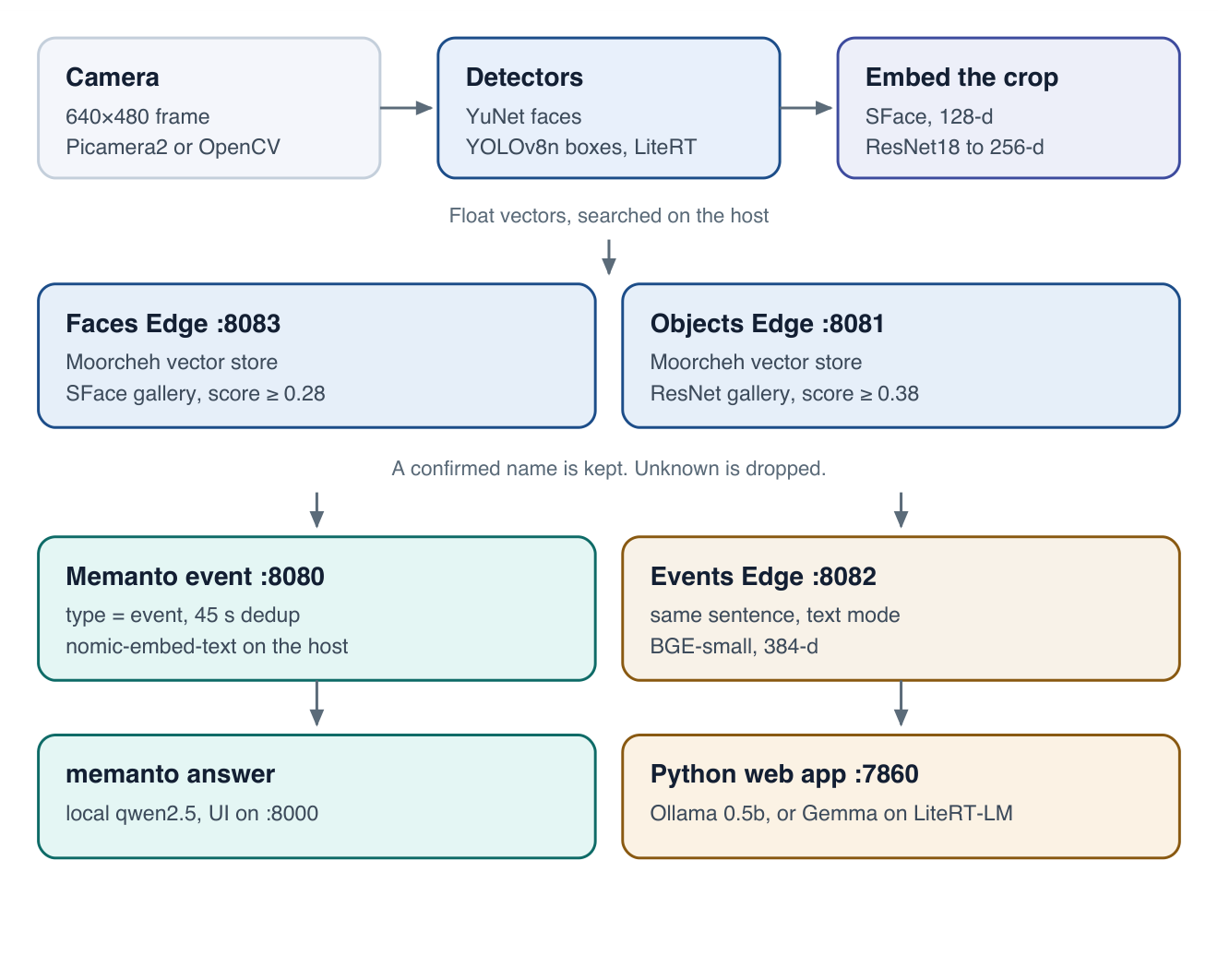
Each Edge container is one flat store. Text mode and vector mode cannot share a store, which is why identity (precomputed image vectors) and event text (BGE) are separate containers. Data sits on disk under ~/.moorcheh-edge/, ~/.moorcheh-edge-objects/, and ~/.moorcheh-edge-events/. Stopping a container does not delete it.
Two live scripts write two different memories, on purpose:
| Script | Detector | Where the event goes | Who answers |
|---|---|---|---|
live_face_and_objects.py | Ultralytics YOLOv8n .pt | Memanto remember --type event | memanto answer (qwen2.5) |
live_face_and_objects_litert.py | LiteRT yolov8n.tflite | Memanto, same call | memanto answer |
live_face_and_objects_litert_events.py | LiteRT yolov8n.tflite | Events Edge :8082 | Flask on :7860 (Ollama or Gemma) |
The Memanto scripts are the facility-memory path: a confirmed face or object becomes an agent memory you can ask about later. The :8082 script is the Pi kiosk path: the same sentence, embedded on the device with BGE, answered by a small local LLM without also hosting the Memanto server.
Pipeline
From a live frame to a stored event and a language answer:
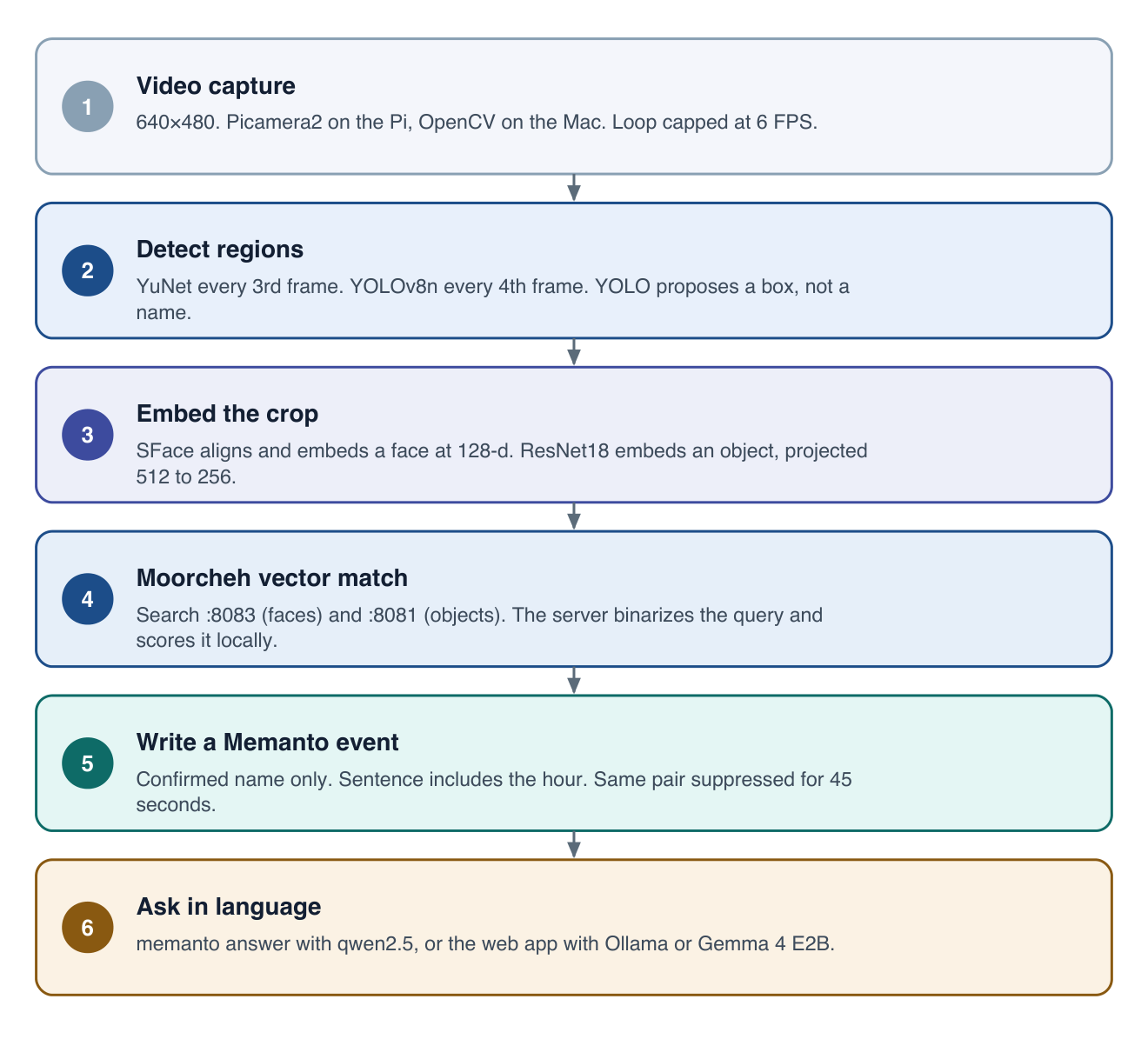
YOLO never returns the enrolled name. It only returns a box. The name comes from the gallery built from known_faces/ and known_objects/. Unknown crops are drawn and dropped. They are not written to memory, so the LLM cannot later invent them.
1. Capture
camera_capture.py selects the backend. On a Pi with Camera Module 3 it uses Picamera2 over CSI. On a Mac it uses cv2.VideoCapture. Resolution is fixed at 640×480. The loop is capped at 6 FPS (TARGET_FPS). Override with CAMERA_BACKEND=opencv or picamera2.
The kiosk opens an OpenCV fullscreen window (VISION_FULLSCREEN=1). Quit is q or Esc with the window focused. User systemd (moorcheh-vision-kiosk.service) starts Docker, the Edge containers, then the live process at desktop login.
2. Detection — classic models, not the gallery
Two detectors run, on a decimated schedule so embedding and search are not paid every frame:
| Stream | Model | Cadence | Input |
|---|---|---|---|
| Faces | OpenCV YuNet (face_detection_yunet_2023mar.onnx) | every 3rd frame | frame scaled to 0.35 |
| Objects | YOLOv8n, PyTorch .pt or LiteRT .tflite | every 4th frame | full 640×480 frame, inference size 256 |
YuNet's live score threshold is 0.5. Between detection frames the last boxes are reused, so the overlay stays stable while embed-and-search runs at face rate and object rate rather than camera rate.
YOLO is a region proposal, and a filtered one:
- Confidence floor
OBJECT_CONF = 0.25. - Boxes smaller than 20×20 pixels are dropped.
- A box larger than 45% of the frame is dropped.
- COCO classes that are not enrolled products are skipped: person, vehicles, furniture, traffic furniture. People are handled by YuNet and SFace, not by YOLO's person class.
- If YOLO returns nothing, one center crop is tried at a stricter threshold (0.55 instead of 0.38) so a single object held up to the lens can still match.
LiteRT changes only this proposal step. SFace, ResNet, and Moorcheh stay as they are.
3. Embed — the vector is computed before it ever reaches Moorcheh
Moorcheh Edge in vector mode does not run an image model. The application computes a float vector and uploads it. Dimension is locked on the first upload and must be one of 128, 256, 384, 768, 1024, or 1536.
Faces. cv2.FaceRecognizerSF aligns the YuNet row (alignCrop) and runs SFace (face_recognition_sface_2021dec.onnx). The feature is L2-normalized. That vector is 128-d, which is on the Edge allowlist, so it is stored as-is.
Objects. Torchvision ResNet18 (ImageNet weights, the final classification layer replaced with identity) yields 512-d. Edge does not accept 512. A fixed Gaussian projection, seeded with NumPy generator 42, maps 512 to 256 and is column-normalized. The reduced vector is L2-normalized again. The same projection is used at enroll time and at match time. CPU only.
Enrollment walks a folder per identity:
known_faces/<PersonName>/*.jpggoes throughenroll_faces.pyto:8083known_objects/<ObjectName>/*.jpggoes throughenroll_objects.pyto:8081
Each item is an id, a vector, and text, with store_mode set to vector. text is the display name search returns (Alice, Case, Mug). id is name/filename. Re-enrolling after a model change requires DELETE /store first. Old vectors from a different embedder must not share a store with new ones.
4. Match — one search per crop, against the local gallery
For each face crop the live loop calls the faces client on :8083. For each object crop it calls the objects client on :8081. Both requests ask for the top 3 hits. The client is MoorchehEdgeApiClient. The server binarizes the query and scores it against the binarized gallery. The Python side only applies a threshold to the score Edge returns:
| Gallery | Accept if | Extra rule |
|---|---|---|
| Face | score ≥ 0.28 | otherwise Unknown |
| Object | score ≥ 0.38 | reject if top-1 and top-2 differ by less than 0.03 |
| Object, center-crop fallback | score ≥ 0.55 | no event if still unknown |
A green box is an enrolled match. A red face box or a blue object box means the detector fired and the gallery did not confirm. Only a confirmed name is eligible for an event. The 0.03 margin exists because two enrolled products can sit close in ResNet space. A coin-flip between them must not be written into memory as fact.
faces_client.search({"query": emb, "top_k": 3})    # :8083
objects_client.search({"query": emb, "top_k": 3})  # :8081
LiteRT — on-device boxes, and on-device Gemma
LiteRT is Google's on-device runtime, the successor to TensorFlow Lite. This system uses it in two places that do not share a model file.
Vision. YOLOv8n exported to .tflite, loaded by Ultralytics, run as the object-box proposer on the Pi.
Language. Gemma 4 E2B packaged as a .litertlm file, run by litert-lm, used only when someone asks a question. It never runs inside the camera loop.
Object proposals: yolov8n.tflite
Export is not supported on Pi aarch64. export_yolo_litert.py runs on a Mac or on x86_64 Linux:
python export_yolo_litert.py
# ultralytics: model.export(format="litert", imgsz=256)
That writes yolov8n.tflite. Copy it to the Pi. The live scripts construct YOLO(path) from Ultralytics. A .tflite path is executed through the LiteRT / TFLite runtime rather than the PyTorch graph. OBJECT_IMGSZ is 256 and must match the export. Override the file with LITERT_YOLO_MODEL. The loader also accepts yolo11n.tflite or yolo26n.tflite if one of those is what you copied.
What this does and does not change:
| Stays on the PyTorch / ONNX path | Moves to LiteRT |
|---|---|
| YuNet and SFace face identity | YOLOv8n forward pass for boxes |
| ResNet18 to 256-d object embedding | |
Moorcheh search on :8083 and :8081 | |
Memanto remember (the LiteRT script that imports event_memory) |
The .pt demo (python live_face_and_objects.py) is untouched. LiteRT YOLO is the Pi proposal path because a full Ultralytics PyTorch forward pass is the heavy piece of the object stream. The gallery match is still a crop embedded by ResNet and searched in Moorcheh. A LiteRT box with no gallery hit is still Unknown and still produces no event.
Answers: Gemma 4 E2B on LiteRT-LM
When the question is answered with ASK_BACKEND=litert, retrieval has already finished. Gemma only writes the reply.
The model is Google Gemma 4 E2B instruction-tuned, converted for LiteRT-LM and published as litert-community/gemma-4-E2B-it-litert-lm. The file this setup runs is gemma-4-E2B-it.litertlm (about 2.59 GB on disk; Google's card lists the E2B package at 2.58 GB). The base weights are google/gemma-4-E2B-it.
LiteRT-LM is the genAI layer on top of LiteRT. LiteRT supplies the kernels: XNNPACK on CPU, ML Drift on GPU. LiteRT-LM adds what a chat model needs that a vision .tflite does not: KV-cache management, prompt templating, and a runner (litert-lm run). The community package uses a mixed 2-bit / 4-bit / 8-bit weight scheme so a text-only footprint can sit well below the raw checkpoint.
Google's published CPU numbers for this file, 1024 prefill tokens and 256 decode tokens, include a Raspberry Pi 5 (16 GB): about 133 tokens/s prefill, 8 tokens/s decode, 7.8 s to first token, about 1.5 GB peak CPU memory. This project's kiosk is an 8 GB Pi 5, so Gemma is the optional, heavier answer path. Everyday questions use Ollama qwen2.5:0.5b. Do not expect the 16 GB benchmark to be the 8 GB number.
ask_events_edge.py does not call a Python generation API. It shells out:
litert-lm run \
  --from-huggingface-repo=litert-community/gemma-4-E2B-it-litert-lm \
  gemma-4-E2B-it.litertlm \
  --prompt="<grounded prompt>" \
  --max-num-tokens 4096 \
  --temperature 0.8
litert lm run is the fallback if litert-lm is not on PATH. Install with pip install --upgrade litert-lm inside faceenv. The first run needs HUGGING_FACE_HUB_TOKEN and an accepted license on the Gemma repo. The download looks hung until the multi-gigabyte file finishes. Later runs use the cache. The subprocess timeout is 600 seconds.
| Variable | Default | Role |
|---|---|---|
LITERT_GEMMA_REPO | litert-community/gemma-4-E2B-it-litert-lm | Hugging Face repo |
LITERT_GEMMA_FILE | gemma-4-E2B-it.litertlm | Weights file inside that repo |
LITERT_MAX_NUM_TOKENS | 4096 | Token budget for prompt plus answer (floor 256) |
LITERT_TEMPERATURE | 0.8 | Sampling temperature |
ASK_STYLE | verbose | verbose asks for 4–8 sentences; concise asks for 1–2 |
ASK_TOP_K | 8 | How many retrieved events are pasted into the prompt |
E2B tends to answer in a short clause unless the prompt demands a list. The verbose style tells it to name every person or object in the hits and to include the hour when the event text has one. Temperature 0.8 is set above a greedy decode so those longer answers are less likely to clip after the first hit. The prompt's hard rule is the same one Memanto's answer path is built around: use only the retrieved events, and say you do not know when they do not contain the answer.
If litert-lm exits non-zero, the CLI still prints the retrieved snippets, so a generation failure does not hide the log.
Gemma is not in the camera process. The fullscreen loop only logs. Generation starts when ask_events_edge.py or the Flask UI selects the LiteRT backend. That split is what keeps a 6 FPS vision loop from sharing the CPU with a multi-gigabyte decode.
Event logging with Memanto
A gallery hit answers "who is in this frame." It does not answer "who was here at 10:00" after they have left. Memanto is the write that turns the hit into a memory an LLM can read later.
Memanto does not implement its own index. Every remember, recall, and answer is served by Moorcheh. On-prem, the CLI talks to the Moorcheh server at http://localhost:8080. Embeddings and answers stay on Ollama: nomic-embed-text to embed the event, qwen2.5 to answer. The camera writes into the active agent vision-events. No API key. After the models are pulled, the write does not leave the machine.
When a write is allowed
event_memory.remember_event runs only from the live loop, and only after all of the following:
- YuNet or YOLO produced a crop.
- Moorcheh returned a gallery score at or above the threshold (and, for objects, outside the 0.03 ambiguity margin).
- The label is not Unknown.
- The same
(kind, name)pair was not logged in the last 45 seconds.
kind is face or object. The 45 second window is in-process. It exists so a person standing in frame does not mint a new memory on every third frame. Restarting the live process clears that window. A different person, or a different object, is logged immediately.
The memory that gets stored
The camera does not store a vector, a crop, or a bounding box. It stores one English sentence plus structured fields Memanto indexes.
Face detection event: person 'Alice' was found at 2026-07-28 10:14:02 EDT (hour 2026-07-28 10:00).
Object detection event: object 'Case' was seen at 2026-07-28 10:14:02 EDT (hour 2026-07-28 10:00).memanto remember "<sentence>" \
--type event \
--title "Face Alice @ 2026-07-28 10:14:02 EDT" \
--tags face,detection,Alice,2026-07-28,hour-10 \
--source live_camera \
--confidence 0.9| Field | Value | Why it is there |
|---|---|---|
| body | The sentence above | This is what semantic search and the LLM read. The hour is written in words (hour 2026-07-28 10:00) so a question that quotes that hour hits the memory as text. |
--type event | One of Memanto's 13 memory types | event means something that happened. The other types (fact, preference, decision, commitment, goal, instruction, relationship, context, learning, observation, error, artifact) are not used by the camera. Recall can filter --type event and ignore anything else the agent has stored. |
--title | Face Alice @ <timestamp> or Object Case @ <timestamp> | Short handle in the memory record. |
--tags | kind, detection, the name, the date, hour-HH | Filterable labels. hour-10 is the clock hour, separate from the full timestamp in the sentence. |
--source | live_camera | Provenance: this memory came from the vision loop, not from a person typing memanto remember. |
--confidence | 0.9 | Set only after the gallery threshold already accepted the match. It is not the Moorcheh similarity score. The score stays in the live overlay. The memory records that the match was confident enough to keep. |
On-prem, remember then does three things the camera does not wait to see:
- Embed the sentence with
nomic-embed-text. - Upload that vector into the
vision-eventsnamespace on the Moorcheh server at:8080. - Keep the typed record — title, tags, type, confidence, timestamp — beside the vector.
The call itself is subprocess.Popen with stdout discarded and start_new_session=True. Embedding and the HTTP upload run in a child process. The capture loop does not stall on them. If memanto is not on PATH, the function prints once and returns. The video loop keeps matching.
What is deliberately not logged
- Unknown faces and unknown objects.
- YOLO's COCO class name. The stored name is the enrolled folder (
Case,Mug), notbottleorcup. - Every frame of a continuous sighting. One event per name per 45 seconds.
- The image. Replay is not the point. The point is a sentence a later question can retrieve.
The other sink, same sentence
live_face_and_objects_litert_events.py does not call Memanto. event_memory_edge.py writes the same sentence into Events Edge on :8082. The Pi embeds it with moorcheh_edge.embeddings.get_embedder(), which is BAAI/bge-small-en-v1.5 at 384-d, and uploads the id, text, and vector with store_mode set to text. That store is what the Python web app and Gemma search. It has no memory types, no tags, and no memanto answer. It is the light log for an 8 GB board. The sentences match so the questions match: "whose face was found at hour …", "which objects were seen …".
Clear a bad events store before mixing embedders:
curl -X DELETE http://localhost:8082/storeMemanto memories are cleared separately. Wiping :8082 does not wipe the agent.
Querying the log with a local LLM
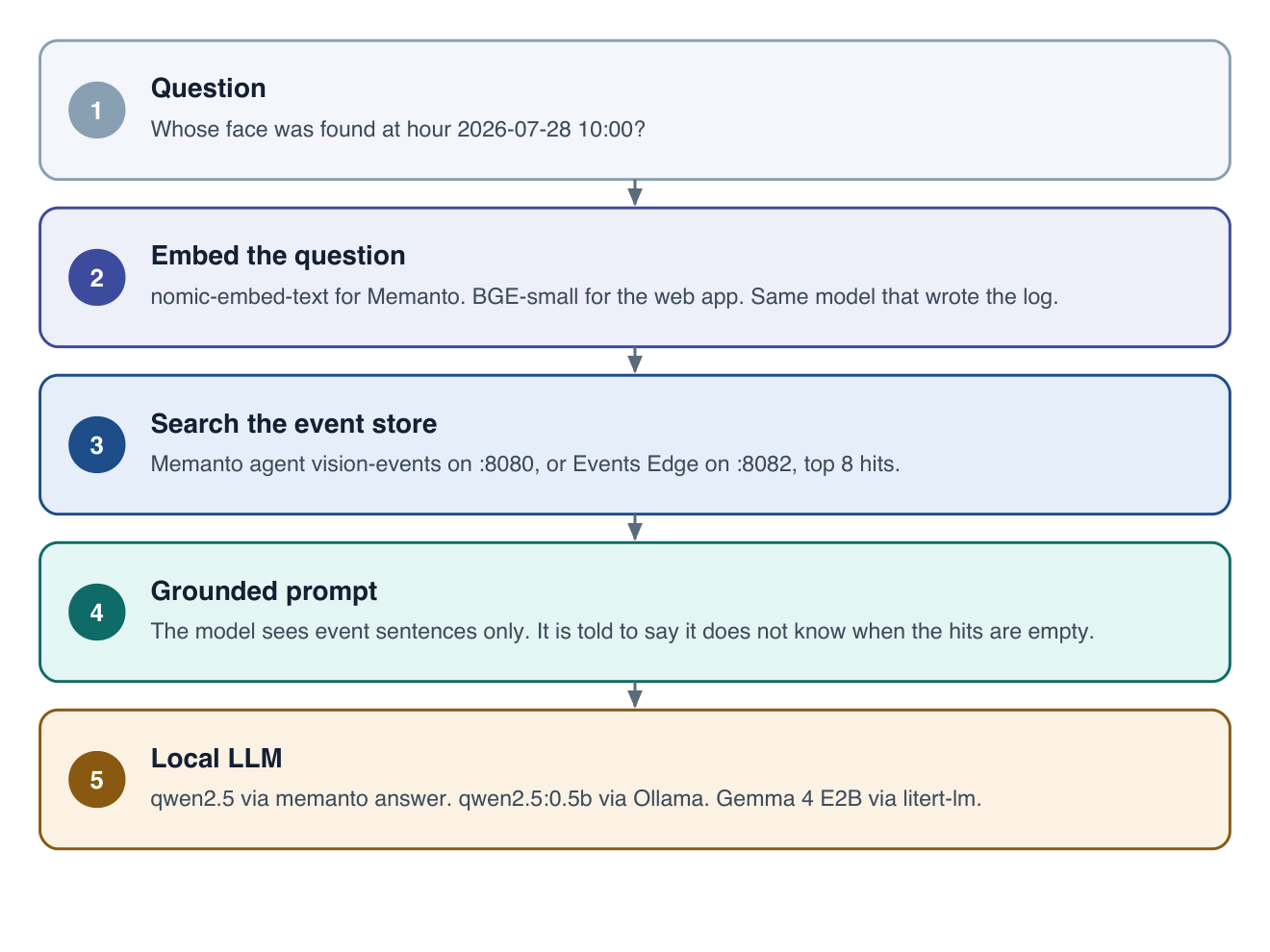
The model is not allowed to look at the camera. Both query paths are retrieval first, generation second. If retrieval is empty, there is nothing for the model to honestly say.
Memanto: recall versus answer
memanto recall returns the raw memories. Semantic search over the agent: the question is embedded, Moorcheh scores the vision-events namespace, and the hits come back with title, content, type, tags, confidence, and score. This is the debug view. It answers "did the camera write anything?" without a language model in the way. Filter with --type event when the agent also holds other memory types. --recent lists newest first and ignores the query text. --as-of and --changed-since are point-in-time reads of the memory store itself. The hour questions in this project do not need those flags, because the hour is already inside the sentence and the tags.
memanto answer is the RAG call. Same retrieval, then the configured LLM (qwen2.5 on the on-prem Ollama default) writes a reply from the hits. event_memory.ask() is that CLI with a 180 second timeout. memanto ui on :8000 is the same agent in a browser.
memanto agent activate vision-events
memanto recall "Whose face was found at hour 2026-07-28 10:00?" --type event
memanto answer "Whose face was found at hour 2026-07-28 10:00?"
memanto answer "Which objects were seen in hour 2026-07-28 10:00?"
What the model receives is not the frame and not the 128-d or 256-d gallery vector. It receives memories shaped like:
[EVENT] Face Alice @ 2026-07-28 10:14:02 EDT
Face detection event: person 'Alice' was found at 2026-07-28 10:14:02 EDT (hour 2026-07-28 10:00).
That is why the sentence is written the way it is. The name, the kind of detection, the full timestamp, and the hour bucket are all in the text the embedder and the LLM share. A question that says "at hour 2026-07-28 10:00" overlaps that text in embedding space. A question that says "which objects" overlaps the object sentences and not the face ones, because those sentences start with "Object detection event."
If the live loop never confirmed a match, recall is empty and answer has no events to cite. The gallery thresholds are the gate. Lowering them would put weak names into memory, and the LLM would report those names with the same confidence it reports a real one. The 0.9 on the memory is not a license for the model to guess past the text.
Memanto's published on-prem floor is 4 cores, 8 GB RAM, and 10 GB of disk, with 16 GB recommended when Ollama is comfortable. On an 8 GB Pi, vision plus the full on-prem stack (nomic-embed-text and a larger qwen2.5) is the tight configuration. The kiosk therefore keeps Memanto as the memory path on machines that can host it, and uses the smaller Ollama or Gemma path when the question is asked against the :8082 log.
Python web app
events_chat_ui/app.py binds 0.0.0.0:7860 so a phone on the same LAN can ask while the Pi display is the fullscreen camera. GET / is the page. POST /api/ask takes JSON with question and backend and calls the same functions as the CLI.
The default backend in the app is ollama with OLLAMA_MODEL=qwen2.5:0.5b. The page can switch to search-only or LiteRT Gemma per request.
For every backend the first two steps are identical:
- Embed the question with the same BGE-small model that embedded the stored sentences. A different embedder would not rank this store correctly.
- Search on
:8082withtop_k8 (overrideASK_TOP_K). Each hit is text plus Moorcheh's score.
search_only stops there and prints the ranked sentences. Use it when an answer looks wrong: the fault is either an empty log or a retrieval miss, and generation will not fix either.
ollama and litert paste those hits into one prompt:
You are a helpful assistant for a local vision event log.
Answer ONLY using the event snippets below.
If the events do not contain the answer, say you do not know.
Give a clear, detailed answer (about 4-8 sentences).
List each relevant person or object you find in the events, with times/hours when present.
If several events match, summarize all of them; do not stop after the first hit.

Events:
1. (score=0.812) Face detection event: person 'Alice' was found at ...

Question: Whose face was found at hour 2026-07-28 10:00?
Answer:
Ollama runs ollama run qwen2.5:0.5b with that prompt (300 second timeout). Gemma runs the litert-lm command above (600 second timeout). Neither model is started by the camera service. Ollama is its own daemon on :11434. Gemma is a one-shot process per question. The chat unit does not start Ollama. If answers fail, check ollama list and curl http://127.0.0.1:11434/api/tags.
qwen2.5:0.5b is the model that fits beside the vision loop on 8 GB. qwen2.5:1.5b is the optional step up. Memanto's on-prem default qwen2.5 is a larger sibling used by memanto answer, not by Flask. Gemma 4 E2B is the LiteRT-native alternative when you want Google's edge LM stack instead of Ollama. It costs a multi-gigabyte download and more RAM, which is why the UI defaults to the 0.5b model and treats Gemma as a selected backend.
What a good answer depends on
| Failure | What you see | What to check |
|---|---|---|
| Match rejected | No memory. The model says it does not know. | Overlay label was Unknown. Check the threshold or the margin. |
| Dedup swallowed a repeat | Only the first sighting in that 45 seconds. | Expected. A new name still logs. |
Wrong embedder in :8082 | Search returns nonsense scores. | DELETE /store and log again with BGE. |
| LLM ignored the log | A fluent answer that names nobody in the hits. | The prompt already forbids this. Prefer search_only to see the hits. |
| Gemma first-run stall | The process is quiet for a long time. | Hugging Face download of gemma-4-E2B-it.litertlm. |
Memanto not on PATH | The live loop prints that remember failed. | Install memanto, on-prem up on :8080, agent vision-events active. |
Why the match and the memory can both stay local
Moorcheh Edge is on-device vector search. moorcheh-edge up pulls moorcheh/moorcheh-edge:latest, listens on localhost, and persists ~/.moorcheh-edge/data. There is no API key. The contract is: the client sends float embedding vectors; the server binarizes them and searches on-device without cloud calls.
That binarization is Maximally Informative Binarization. The same engine replaces HNSW plus float32 cosine: deterministic, exhaustive search over the binary codes. Moorcheh's published figure for a small ARM board is about 17 ms to search 10,000 vectors, with a per-store cap of 10,000 items (HTTP 409 past the cap). A site gallery of faces or objects is far under that cap. The event log is a second store, also under that cap, also local.
| Mode | Who embeds | Dimension | Used here for |
|---|---|---|---|
| vector | This application (SFace, ResNet) | 128 or 256 | Face gallery :8083, object gallery :8081 |
| text | Python client, BGE-small-en-v1.5 | 384 | Event sentences on :8082 |
| on-prem, via Memanto | Ollama nomic-embed-text | Memanto's embedding size | Typed event memories on :8080 |
Vector mode is the live match. Edge never sees pixels. It sees the float vector SFace or ResNet produced, then keeps the binary form. Text mode on :8082 is the searchable transcript of those matches. Memanto's on-prem server is the same family of engine behind typed memory: namespaces, similarity search, and a grounded answer, on hardware you control.
What that means for a robot or a fixed camera:
- The frame path is a localhost search. One HTTP search per crop, every few frames, against a binarized gallery. No cloud ANN on the way to a name.
- The memory path is also local.
rememberembeds on the host and writes to:8080.answerembeds the question on the host and generates with Ollama on the host. - The index is not the RAM problem. YOLO, ResNet, and the LLM dominate memory. The Edge containers are small Docker images beside them. Three stores fit because each one is a flat binarized file, not a float32 HNSW graph.
- Ranking quality is MIB's job. Policy is the application's. Binary codes are meant to preserve the order of the original embeddings. The 0.28 and 0.38 thresholds and the 0.03 margin are this setup's decision about which of those scores become a Memanto event.
- Stores do not share a dimension. Faces at 128-d, objects at 256-d, and event text at 384-d cannot be mixed. Wiping objects does not wipe people or the event log.
- No egress after the weights are local. Gallery match, event write, and the LLM reply do not need the network. That is the property a warehouse VLAN or a closed facility requires.
What you can ask
The live loop is built for two question shapes:
- Whose face was found at hour
YYYY-MM-DD HH:00? - Which objects were seen in hour
YYYY-MM-DD HH:00?
Without an hour, against whatever was logged: "Whose face was found recently?", "Which objects were seen today?"
The system will not name a person who was never enrolled, will not treat a YOLO class as an identity, will not log every frame, and will not answer from video it did not match.
Run it
Memanto path (PyTorch YOLO or LiteRT YOLO, events in the agent):
cd ~/Moorcheh-Face
source faceenv/bin/activate
./start_faces_edge.sh          # :8083
./start_objects_edge.sh        # :8081
docker start moorcheh-onprem-server   # :8080
python enroll_faces.py         # once
python enroll_objects.py       # once
memanto agent activate vision-events
python live_face_and_objects.py
# or, on the Pi, after yolov8n.tflite is present:
python live_face_and_objects_litert.py
After at least one green box has been on screen:
memanto recall "Whose face was found at hour 2026-07-28 10:00?" --type event
memanto answer "Whose face was found at hour 2026-07-28 10:00?"
memanto ui                     # http://localhost:8000
Kiosk path (LiteRT YOLO, events on :8082, browser LLM):
./start_events_edge.sh
python live_face_and_objects_litert_events.py
cd events_chat_ui
OLLAMA_MODEL=qwen2.5:0.5b python app.py   # http://<pi-ip>:7860
Gemma instead of Ollama, from the repo root, after HUGGING_FACE_HUB_TOKEN is set:
ASK_BACKEND=litert python ask_events_edge.py \
  "Whose face was found at hour 2026-07-28 10:00?"
Health before blaming the model:
curl -s localhost:8083/health; echo
curl -s localhost:8081/health; echo
curl -s localhost:8080/health; echo
curl -s localhost:8082/health; echo
memanto recall showing an event, or items increasing on :8082, is the check that a match was stored. Generation comes after that.
References
- Moorcheh Edge — on-device MIB search, no API keys, about 17 ms for 10k vectors.
- Moorcheh Edge docs — vector vs text mode, binarized upload, local RAG.
- Memanto On-Prem — local Moorcheh backend, typed memory, Ollama, no egress.
- Memanto recall — natural-language search over an agent's memories.
- Gemma 4 on LiteRT-LM, including the Pi 5 CPU row.
- Gemma 4 E2B LiteRT-LM weights.